FELoadbalancerUnhealthy#
Explanations#
Critical#
This alert rule monitors the health of servers behind a load balancer in a FlexibleEngine environment. The percentage of healthy servers is 0% for 5 minutes then this alert is triggered. This indicates that no traffic can reached your K8S cluster.
Warning#
This alert rule monitors the health of servers behind a load balancer in a FlexibleEngine environment. If the percentage of healthy servers is less than 100% for 5 minutes then this alert is triggered.
Troubleshooting hints#
To resolve this issue, complete the following tasks:
- Connect on FE Console
- Select the region
- Go to Elastic Load Balance service
- Select the concerned ELB
- Check listeners (https; http,1080-tcp,...) to identify the unhealty backends (See https backends example below).
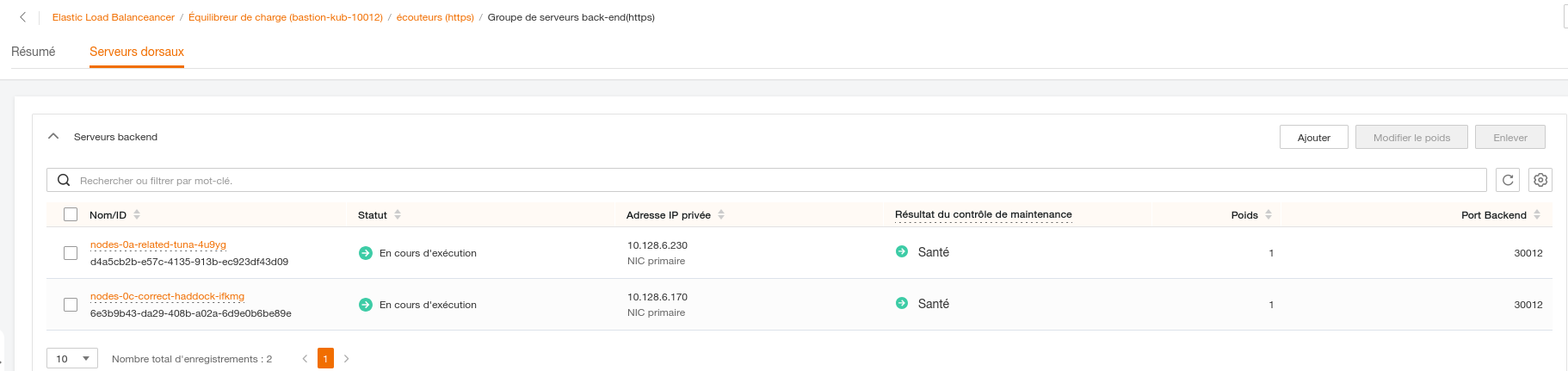
- Check that IPs and ports are good:
- The private IP from LB must match the K8S node IP carrying the ingress-controller pod (See nodes IPs example below).

- The Backend port from LB must match the node port from the ingress-* service. (See backends ports example below)

- The private IP from LB must match the K8S node IP carrying the ingress-controller pod (See nodes IPs example below).
kubectl -n <INGRESS_NAMESPACE> get pods -o wide
kubectl -n <INGRESS_NAMESPACE> get svc
FELoadbalancerHealthyWarning#
Explanations#
This alert rule monitors the health of servers behind a load balancer in a FlexibleEngine environment. If the percentage of healthy servers is less than 100% for 5 minutes then this alert is triggered.
Troubleshooting hints#
see above, it is the same troubleshooting hints that FELoadbalancerHealthyCritical