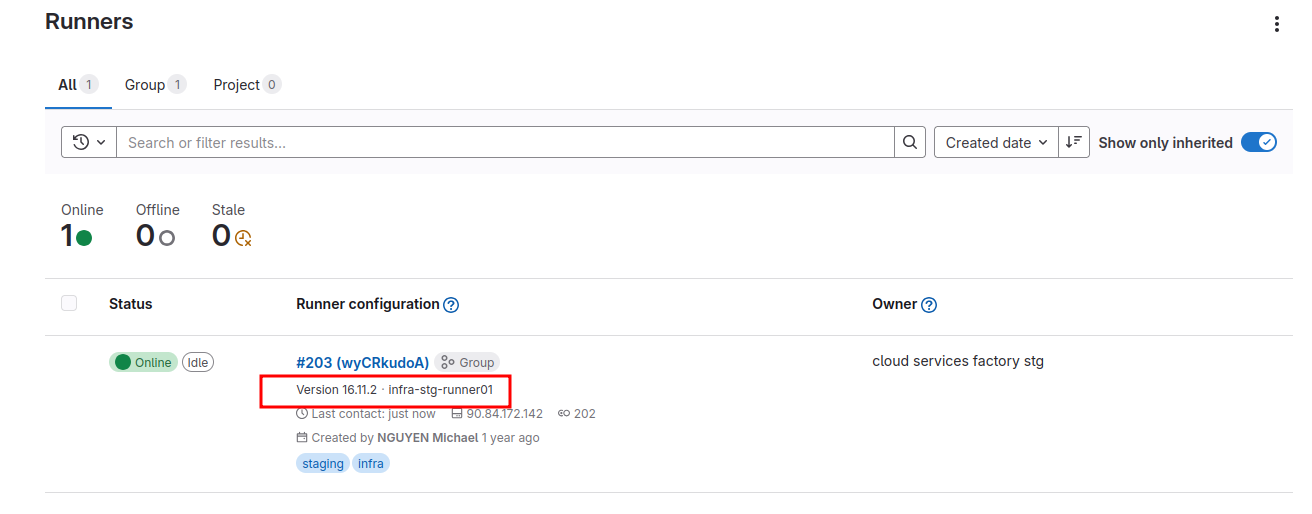
Gitlab Runner#
Official GitLab Runner documentation
Deploy the runner (on Kubernetes)#
Example of useful configuration parameter:
# set the number of concurrent jobs
concurrent: 10
See values.yaml file for more parameters
Add runner#
See the D&D documentation.
Use specific runner#
To use a specific runner you need to use tags in your jobs declaration.
Example (on cloud services factory stg):
stages:
  - test-external-cust-connectivity

netcat-cust-env:
  stage: test-external-cust-connectivity
  tags:
    - infra
    - staging
  image: alpine
  before_script:
    - apk add jq
  script:
    - export CUST=$(cat ./customers/cust_list.json | jq)
    - echo $CUST
Tags#
The declared runners tags are:
- infra, staging for staging project: cloud services factory stg
- infra, prod for production project: cloud services factory
Sample task definition#
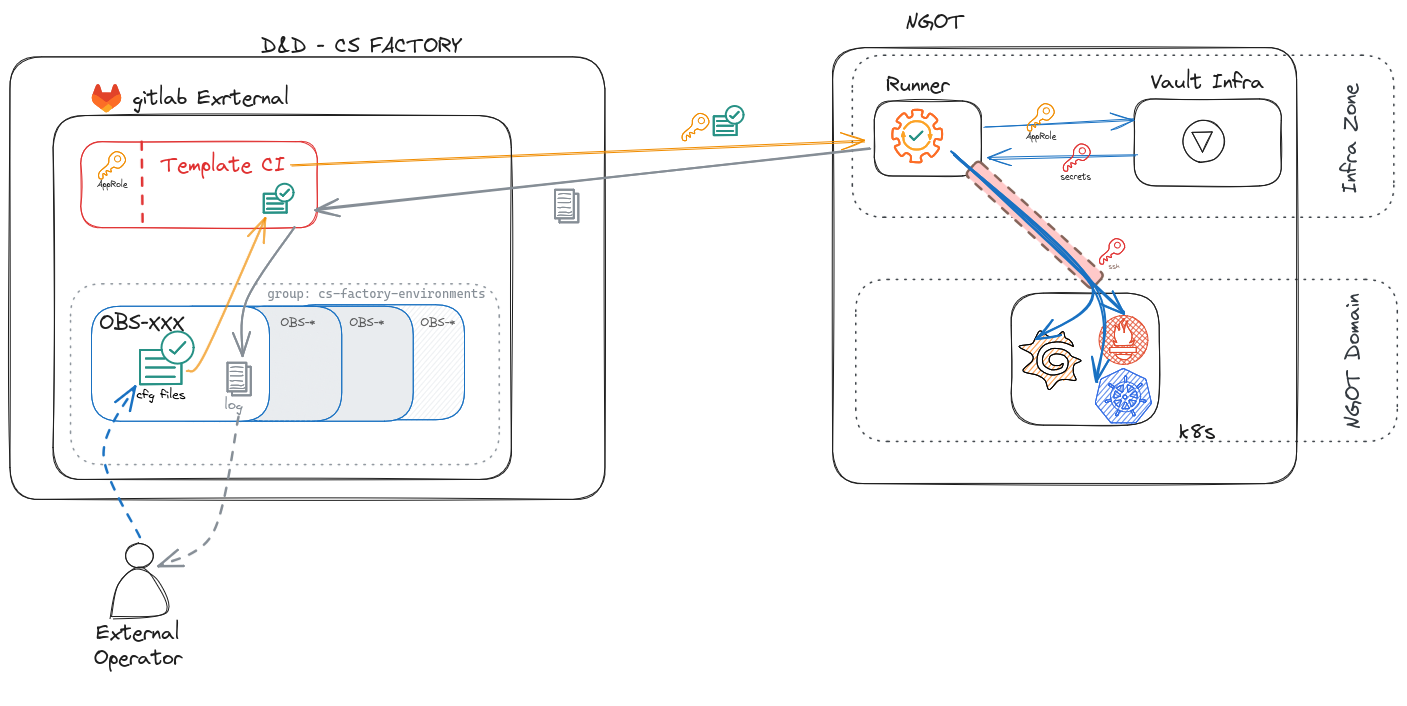
This sample task, can manage prometheus rules, probes and grafana dashboard on target cluster for the customer obs-test06. The RBAC k8S are only available for this customer and restricted to the manage of monitoring in the target namespace.
It is just a sample to demonstrate how to connect on K8S cluster for the client obs-test06. It will be necessary to industrialize the management with all clients.
You must provide :
test06_grafana_roleidandtest06_grafana_secretidas secret in GitLab for vault access.test06__monitoring_roleidandtest06_monitoring_secretidas secret in GitLab for vault access.
variables:
  ZONE_BASTION: bst.admin-stg.csfpriv.com # use by k8-access-gitlabrunner

default:
  image:
    name: docker-registry.caascad.com/internal/gitlab-runner-helm:v1.2.0
  # All stages are done on you own runner
  tags:
    - infra
    - staging

.authentication:
  before_script: |-
    #Authentification vault avec app_role
    export CLIENT=test06

    if [[ "$TYPE_TOKEN" == "grafana" ]]; then
      export ZONE_NAME="svc-grafana-client-${CLIENT}"
      eval export APPROLE_ROLE_ID=${CLIENT}_grafana_roleid
      eval export APPROLE_SECRET_ID=${CLIENT}_grafana_secretid
    elif [[ "$TYPE_TOKEN" == "monitoring" ]]; then
      export ZONE_NAME="svc-monitoring-stack-client-${CLIENT}"
      eval export APPROLE_ROLE_ID=${CLIENT}_monitoring_roleid
      eval export APPROLE_SECRET_ID=${CLIENT}_monitoring_secretid
    else
      echo "Invalid TYPE; must be grafana or monitoring"
      exit 1
    fi
    export KUBECONFIG=/tmp/config
    export VAULT_ADDR="https://vault.infra-stg.caascad.com"
    vault write auth/approle/login role_id=${!APPROLE_ROLE_ID} secret_id=${!APPROLE_SECRET_ID} -format=json | jq .auth.client_token -r >"$HOME/.vault-token"
    k8s-access-gitlabrunner

stages:
  - grafana
  - prometheus

grafana-configmap:
  stage: grafana
  variables:
    TYPE_TOKEN: grafana
  extends:
    - .authentication
  script:
    - kubectl get cm -n grafana-dashboards-obs-${CLIENT}

prometheus-rules:
  stage: prometheus
  variables:
    TYPE_TOKEN: monitoring
  extends:
    - .authentication
  script:
    - kubectl get prometheusrules -n rules-obs-${CLIENT}

prometheus-probes:
  stage: prometheus
  variables:
    TYPE_TOKEN: monitoring
  extends:
    - .authentication
  script:
    - kubectl get probes -n probes-obs-${CLIENT}
Tip
You can check how to retrieve vault approle role-id and secret-id here.
Upgrade GitLab Runner#
Compatibility versions
For compatibility reasons, the GitLab Runner major.minor version should stay in sync with the GitLab major and minor version. Older runners may still work with newer GitLab versions, and vice versa. However, features may not be available or work properly if a version difference exists.
Backward compatibility is guaranteed between minor version updates. However, sometimes minor version updates of GitLab can introduce new features that require GitLab Runner to be on the same minor version.
Requirements#
Before upgrade the GitLab Runner, get the targeted GitLab server version:
- Go to GitLab DX Store external
How to upgrade#
- Identify the Helm version corresponding to the GitLab server
-
Helm charts and GitLab Runner do not follow the same versioning. To see version mappings between the two, run the command for your version of Helm
An example of the output:helm repo add gitlab https://charts.gitlab.io helm repo update gitlab helm search repo -l gitlab/gitlab-runner --version '>0.80.0'NAME CHART VERSION APP VERSION DESCRIPTION gitlab/gitlab-runner 0.83.1 18.6.1 GitLab Runner gitlab/gitlab-runner 0.83.0 18.6.0 GitLab Runner gitlab/gitlab-runner 0.82.0 18.5.0 GitLab Runner gitlab/gitlab-runner 0.81.0 18.4.0 GitLab Runner gitlab/gitlab-runner 0.80.1 18.3.1 GitLab Runner ... -
Move into GitLab Runner local repository and update
upstreambranch with remotemainbranchcd <GIT_DIRECTORY>/applications/gitlab-runner-chart git remote add upstream https://gitlab.com/gitlab-org/charts/gitlab-runner.git git pull upstream main git fetch upstream --tags git push origin upstream git push origin upstream --tags -
Select targeted version and create new patch branch
GITLAB_RUNNER_VERSION='<CHART_VERSION>' # Eg. 0.83.1 git checkout "v${GITLAB_RUNNER_VERSION}" git switch -c "pkg-${GITLAB_RUNNER_VERSION}" -
Cherry-pick patchs from previous
pkgbranchPREVIOUS_GIT_BRANCH='origin/pkg-<PREVIOUS_VERSION>' # Eg. PREVIOUS_GIT_BRANCH='origin/pkg-0.76.3' git log --oneline $PREVIOUS_GIT_BRANCH --not $(git for-each-ref --format='%(refname)' refs/heads/ | grep -v "$PREVIOUS_GIT_BRANCH") # Eg. # df6c7b7 (origin/pkg-0.76.3) feat(helm): add sidecar for monitoring # 70564d6 feat(helm): add dashboard # 667a13d feat(toolbox): init shell.nix git cherry-pick <COMMIT_SHORT_SHA> # inverted order (start with last one) -
Create Helm package.
Update chart version in
Chart.yamlfile.version: 0.83.1-1Then create the package.
helm package .Result is a file named
gitlab-runner-0.83.1-1.tgz -
In the
gitlab-runnerproject:Update versions in
Chart.yaml:version: 1.2.0 appVersion: 0.83.1-1Replace the
tgzfile:rm <GIT_DIRECTORY>/caascad/applications/gitlab-runner/helm/charts/*.tgz cp <GIT_DIRECTORY>/applications/gitlab-runner-chart/gitlab-runner-*.tgz <GIT_DIRECTORY>/caascad/applications/gitlab-runner/helm/charts -
Deploy on staging.
Update the <GIT_DIRECTORY>/caascad/terraform/envs-ng/contexts/caascad/gitlab-runner.cue to use the new tag and upgrade the internal/gitlab-runner tag. (eg: alpine-v18.6.1)
The `tackbone` commands are :
```sh
cd <GIT_DIRECTORY>/caascad/terraform/envs-ng/contexts/caascad
trackbone plan -z infra-stg -c gitlab-runner
# trackbone apply -z infra-stg -c gitlab-runner
```
-
Validate runner deployement with Trackbone on Staging
- GitLab DX Store - Staging (cs-factory-stg)
-
If staging deployment is validated, you can tag your tag branch
Warning
Don't merge your patch branch into
upstreambranch. -
Tag your validated branch and deploy this version on Production with Trackbone
git tag -a "pf-${GITLAB_RUNNER_VERSION}" git push origin upstream --tags -
Check the version deployed is the new version
- GitLab DX Store - Production (cs-factory)