Quay - Caascad Registry#
This page describes the architecture and workflow that has been implemented for our own regitry.
Warning
At the time of writing this documentation (15/01/2021), docker registries on infra-stg and infra-prd are still in use and they will be deleted when all our images are migrated on OCB-CORP registry.
New caascad-user#
To be able to use the docker registry, you first need to authenticate via OIDC https://docker-registry.ocb-corp.caascad.com/ Then, ask an admin (channel equipe_apps) to give you permissions to Organizations internal, external and dev.
Architecture#
Caascad docker registry is deployed in the OCB-CORP zone.
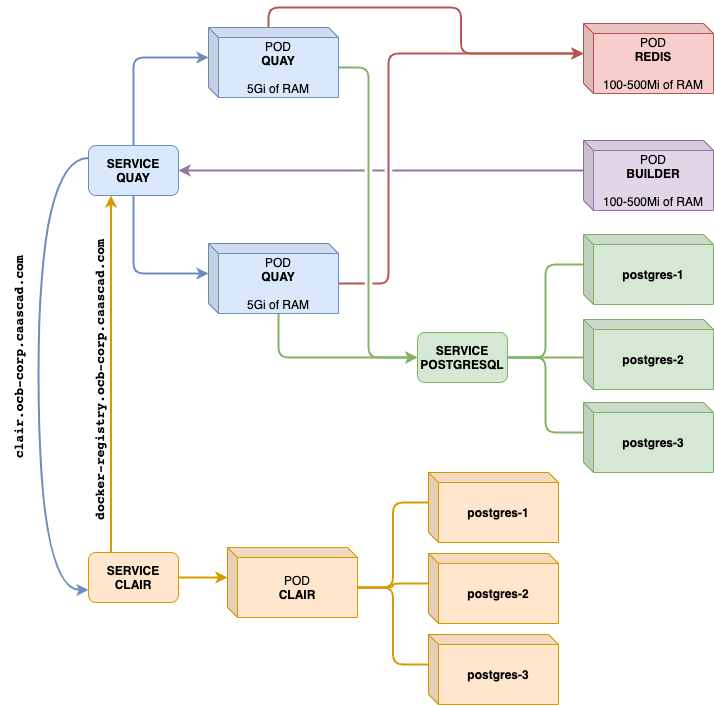
Organizations / repositories#
OCB-CORP docker registry is publicly exposed so all repositories MUST be private.
Exceptions are possible, but they must be clearly identified, explained and validated.
Three main organizations have been defined in our registry:
devexternalinternal
The dev organization is intended to host images under build in progress or test. Once the build of an image is validated, and the image is ready to be deployed in Caascad environments, this image can be moved in one of the other two organizations: external or internal.
The purpose of the external organization is to host:
- Images deployed in every zone
- Images of components deployed in client zone
- Images that can be made "visible" by the client
Note
The pull of images from Caascad OCB-CORP registry is authenticated. The authentication token will be provided via a K8S secret in client cluster. Therefore, anybody that has access to cluster, will have access to this secret and can retrieve the images from external organization.
The images that we do not want to make visible to our clients will be stored in internal organization
Mirroring AWS#
Note
This section is not implemented yet (15/01/2021)
In order to tolerate Quay, OCB-CORP or FE failures, OCB-CORP Quay repositories from external and internal organizations are mirrored to read-only Quay installation in CORP-AWS client zone. Repositories from dev organization will not be mirrored to AWS.
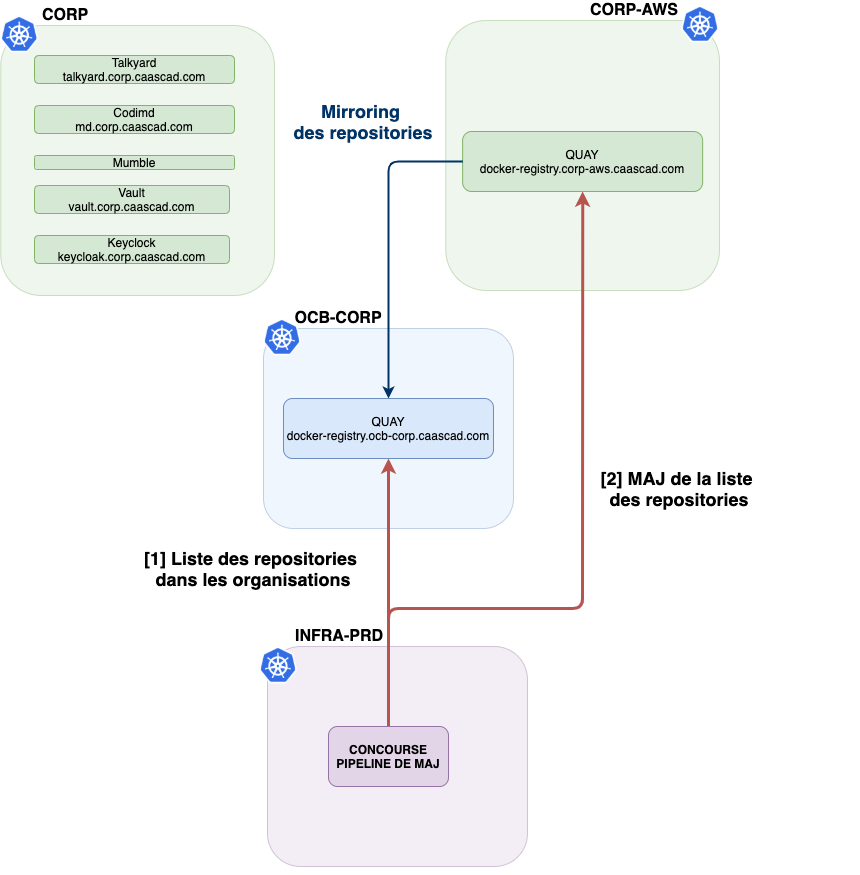
Two specific pipelines are implemented:
- pipeline that scans
OCB-CORPregistry, detects new repositories and dynamically configures the mirroring - mirroring supervision
Domain name#
In order to allow Caascad devops to deploy Caascad tooling from OCB-CORP or CORP-AWS docker-registries we configured unique domain name for our registry docker-registry.caascad.com that is pointing by default to docker-registry-primary.caascad.com that is the CNAME to docker-registry.ocb-corp.caascad.com
If OCB-CORP registry is down, docker-registry.caascad.com resolution will temporarily switch to docker-registry-secondary.caascad.com that is the CNAME to docker-registry.corp-aws.caascad.com.
When to use docker-registry and docker-registry.ocb-corp
- In Kubernetes objects (deployments, pods...), use
image: docker-registry.caascad.com:... - In your web brower, use the URL https://docker-registry.ocb-corp.caascad.com/
The difference is that "docker-registry" is a CNAME for HA in Kubernetes clusters while "docker-registry" is the primary and read-write registry.
Access to private repositories#
All repositories on OCB-CORP / CORP-AWS Quay are private.
To manage authentication for applications deployments Quay robot accounts is created with RO access:
- One for each Caascad client in the
externalorganization- external+fe-ocb-xxx / external+aws-ocb-xxx
- One for Caascad in
internal/external/devorganisations- external+fe / external+aws
- internal+fe / internal+aws
- dev+fe
Robot account management
An additional pipeline is watching git caascad-zone repository in order to add new robot accounts when new cloud zone is created. Pipelines
Code source GIT
Since all our deployments are made from infra zone, all robot account RO credentials will be transformed in K8S secrets of docker-registry type and will be stored in infra vault (stg/prd) in concourse-infra/global/ path. This way they can be accessed from our Concourse instance for example.
Docker registry secret nomenclature/scope#
Several types of secrets are stored in infra vault (stg/prd) in concourse-infra/global/ path.
RW credentials to be used in Concourse pipelines to pull/push images from/to OCB-CORP docker registry |
|---|
| docker-registry-dev |
| docker-registry-internal |
| docker-registry-external |
| K8S secrets to be used for deployments in cloud/infra zones and NOT in client zone |
|---|
| docker-registry-dev-ro |
| docker-registry-internal-ro |
| docker-registry-external-ro |
| K8S secrets to be used for deployments in client zones of OCB-XXX cloud zone |
|---|
| docker-registry-external-ro-ocb-XXXX |
Kubernetes Authenticated deployment#
To pull an image from the private registry, Kubernetes needs credentials. In the pod definition, the imagePullSecrets field specifies that Kubernetes should get the credentials from this Secret. So, the secret with the given name must exist in application namespace before deployment and must be referenced by application deployment manifests.
Automated secret deployment#
If you want to deploy the registry secrets for your namespace on every platform, you should use this procedure. If you just need to do some testing, you can still use trackbone, but keep your code localy.
You need to verify first that your namespace is listed in the configuration quay_robots_secrets:
git clone git@git.corp.caascad.com:caascad/terraform/envs-ng.git
cd envs-ng
vim quay_robots_secrets.cue
Scroll down until you see the following part:
if zone.type == "infra" {
    namespace_list: [
        "concourse-infra",
        "your-namespace-here",
    ]
}
if zone.type == "cloud" {
    namespace_list: [
        "concourse",
        "concourse-infra",
        "your-namespace-here",
    ]
}
if zone.type == "client" {
    namespace_list: [
        "your-namespace-here",
    ]
}
Your namespace isn't listed#
If your namespace does not appear in the right list, you can add it. Be careful, there is a list per type of zone!
After you add your namespaces, check and fix the formatting of your file:
cue fmt quay_robots_secrets.cue
Now, you can create a new branch and open a Merge Request. The MR will trigger some pipelines and will allow you to review all the changes. Once you reviewed your changes, you can apply it by writing trackbone apply in the comment section.
Your namespace is listed but the secret is missing#
If you can't find the secret in the namespace, maybe the configuration has hasn't been applied. You can try to run Trackbone localy:
trackbone plan -c quay_robots_secrets -z ZONE-NAME
trackbone apply -c quay_robots_secrets -z ZONE-NAME
Use-case 1: s3usage-exporter image development#
s3usage-exporter is an application that calculates and exports client's S3 buckets size and it's implemented internally by Monitoring Team.
This use-case show the steps after the code was ready and when it was time to work on the docker image. This use-case does not show the steps to deploy s3usage-exporter in Production.
Since the image is in construction, it will be placed in dev organization.
docker-registry.caascad.com/dev/s3usage-exporter
Deployment secret#
Since the image is located in dev organization the name of the secret will always be docker-registry-dev. So, add a reference to secret in the configuration of Kubernetes pods:
imagePullSecrets:
- name: docker-registry-dev
Image Validation#
The image can be validated on STG Cloud (ocb-testXX, ocb-demo) or STG Client zone (delta, charlie, etc) or on STG Infra (infra-stg) depending on the scope of it.
If your namespace is listed in envs-ng you can skip this step.
Get secret from Vault and add this secret in application namespace:
→ export VAULT_ADDR=https://vault.infra-stg.caascad.com

→ vault list secret/concourse-infra/global/ | grep dev-ro
docker-registry-dev-ro

→ vault read -field="value" secret/concourse-infra/global/docker-registry-dev-ro > secret.json

→ kubectl create -f secret.json --namespace ${NAMESPACE}
secret/docker-registry-dev created
Now the pod can retrieve the image and the tests (and development iterations) can start.
Next step : promotion to external or internal#
When the image is validated, it should be promoted to external or internal organization depending on its scope link.
Use-case 2: Promtail deployment#
Promtail image is located in external organization
docker-registry.caascad.com/external/promtail
Note
Since promtail is installed in client zone, promtail image can't be elsewhere other than this organization link
Deployment secret#
Since the image is located in external organization the name of the secret will always be docker-registry-external-fe. So, add a reference to secret in the configuration of Kubernetes pods:
imagePullSecrets:
- name: docker-registry-external-fe
Deployment Infra or Cloud zones#
The deployment is done in an Infra or Cloud zone and the image is located in external organization. So, we will use global organization secret.
If your namespace is not listed in envs-ng, you should add it by following this section.
Get secret from Vault and add this secret in application namespace
→ export VAULT_ADDR=https://vault.infra-stg.caascad.com

→ vault list secret/concourse-infra/global/ | grep external-ro
docker-registry-external-ro
docker-registry-external-ro-ocb-cmmli
docker-registry-external-ro-ocb-corp
docker-registry-external-ro-ocb-fh
docker-registry-external-ro-ocb-test05
docker-registry-external-ro-ocb-test06

→ vault read -field="value" secret/concourse-infra/global/docker-registry-external-ro  >> secret.json

→ kubectl create -f secret.json --namespace logging
secret/docker-registry-external-fe created
Next step is to deploy Promtail.
Deployment in client zone of OCB-DEMO cloud zone#
Since the deployment is done in a client zone related to OCB-DEMO cloud zone we will use external organization secret that corresponds to this zone i.e. OCB-DEMO
If your namespace is not listed in envs-ng, you should add it by following this section.
Get secret from Vault and add this secret in application namespace:
→ export VAULT_ADDR=https://vault.infra-stg.caascad.com

→ vault list secret/concourse-infra/global/ | grep ocb-demo
    docker-registry-external-ro-ocb-demo
    kubernetes-ocb-demo
    vault-ocb-demo

→ vault read -field="value" secret/concourse-infra/global/docker-registry-external-ro-ocb-demo  >> secret.json

→ kubectl create -f secret.json --namespace caascad-logging
secret/docker-registry-external-fe created
Next step is to deploy Promtail.
Use-case 3: nginx-ingress-controller deployment#
Nginx ingress controller image is located in internal organization
docker-registry.caascad.com/internal/nginx-ingress-controller
Note
Since nginx-ingress-controller is installed in cloud and infra zone it's image should be located in internal organization. link
Deployment secret#
Since the image is located in internal organization the name of the secret will always be docker-registry-internal-fe. So, add a reference to secret in the configuration of Kubernetes pods
imagePullSecrets:
- name: docker-registry-internal-fe
Deployment Infra or Cloud zones#
The deployment is done in an Infra or Cloud zone and the image is located in internal organization. So, we will use global organization secret.
If your namespace is not listed in envs-ng, you should add it by following this section.
Get secret from Vault and add this secret in application namespace
→ export VAULT_ADDR=https://vault.infra-stg.caascad.com

→ vault list secret/concourse-infra/global/ | grep internal-ro
docker-registry-internal-ro

→ vault read -field="value" secret/concourse-infra/global/docker-registry-internal-ro  >> secret.json

→ kubectl create -f secret.json --namespace ingress-nginx-public
secret/docker-registry-internal-fe created
Next step is to deploy nginx-ingress-controller