What to do in case of a ZeroSSL incident?#
Why ZeroSSL?
We use ZeroSSL as our certificate authority to automatically obtain a certificate when an Ingress resource is created on a Kubernetes cluster.
Incident/Maintenance period with ZeroSSL
An incident or maintenance period may occur at ZeroSSL, which can prevent the creation or renewal of a certificate. If this happens, it's possible to change the certificate authority used by an Ingress resource to Let's Encrypt instead.
Info
Command to get the list of certificate authorities configured in the cluster:
kubectl get ClusterIssuers
Output
NAME                READY   AGE
ca-issuer           True    67d
letsencrypt-prod    True    67d
selfsigned-issuer   True    67d
zerossl             True    67d
How to know if ZeroSSL is unavailable?#
Incident or maintenance perdiod
To find out if an incident or maintenance period is in progress at ZeroSSL, you need to log in to https://zerossl.com and authenticate with the credentials obtained as follows:
Note
Username : gopass show caascad/zerossl/username
Password : gopass show caascad/zerossl/password
If an incident or maintenance period is underway, an info message should appear at the top of the dashboard.
Example
ZeroSSL will perform scheduled maintenance on Saturday, 20th of November from 7 am - 9 am (GMT+1). Learn more.
You then need to go to the Service Notifications page by clicking on Learn more or by clicking the following link
This page indicates if ZeroSSL is currently undergoing maintenance or an incident.
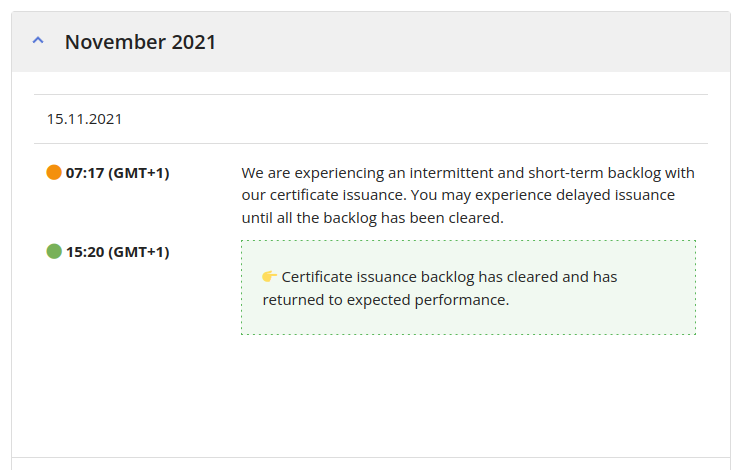
Example
This page indicates if ZeroSSL is currently undergoing maintenance or an incident. We can see that ZeroSSL was under maintenance on November 15, 2021, from 7:17 AM to 3:20 PM.
How to use Let's Encrypt if ZeroSSL is unavailable#
To use the letsencrypt-prod certificate authority instead of zerossl, you need to modify the Ingress resource with the following command:
kubectl -n <namespace> patch ingress <ingress_name> --patch '{
    "metadata": {
        "annotations": {
            "cert-manager.io/cluster-issuer": "letsencrypt-prod"
        }
    }
}'
You will need to switch the ingress back to the zerossl certificate authority once it becomes available again, as follows:
kubectl -n <namespace> patch ingress <ingress_name> --patch '{
    "metadata": {
        "annotations": {
            "cert-manager.io/cluster-issuer": "zerossl"
        }
    }
}
Note
In cases where you need to deploy a new zone (cloud zone only), it can be a bit tedious to have to modify the ingress resources after deploying each application.
OPA can be used to automate the replacement of zerossl with letsencrypt-prod in the cert-manager.io/cluster-issuer annotation when deploying the following ConfigMap :
apiVersion: v1
data:
    mutate-ingress-cert.rego: "package library.kubernetes.admission.mutating\n\n############################################################\n#
    PATCH rules \n#\n# Note: All patch rules should start with `isValidRequest` and
    `isCreateOrUpdate`\n############################################################\n\n#
    patch: Mutate cert-manager annotation on ingress\npatch[patchCode] {\n\tisValidRequest\n\tisCreateOrUpdate\n\tinput.request.kind.kind
    == \"Ingress\"\n\n\tingress := input.request.object\n\n\t# Check annotation\n\thasAnnotationValue(ingress,
    \"cert-manager.io/cluster-issuer\", \"zerossl\")\n\n\tpatchCode = makeAnnotationPatch(\"replace\",
    \"cert-manager.io/cluster-issuer\", \"letsencrypt-prod\", \"\")\n}\n"
kind: ConfigMap
metadata:
    labels:
    openpolicyagent.org/policy: rego
    name: mutate-ingress-issuer
    namespace: opa