Structure#
This page presents the IAM structure of Caascad on Azure tenants.
Users#
Because we use the External Identities feature to federate Keycloak Corp users with Azure, it is necessary to invite one guest user per Keycloak Corp user.
This is done by envs-ng keycloak-caascad-users configuration.
This results in the creation of two Azure users <username>_caascad_staging
and <username>_caascad_prod, both stored in the Terraform state.
NB: the process of user deletion is also handled as Azure guest users will be automatically deleted if the corresponding users aren't in users.cue anymore.
Groups#
Azure users do not have individually assigned roles by default. Instead we use groups to gather up Caascad users with the same level of permissions. This allows a better management of users as we create roles assignements on groups directly.
As of now, we have a single group available on both staging and prod tenants: cscd-power-user has the Contributor role on the whole subscription.
Those groups and memberships are managed by the following configurations:
- Two envs-ng configurations,
azure_iam_caascad_stagingandazure_iam_caascad_staging, deploying resources on both staging and prod tenants. This is defined in the azure_iam.cue file. - A azure_iam Terraform configuration which contains the necessary resources to be deployed on both Azure and Vault Corp.
Cloud Zones#
For Cloud zones, we create a dedicated Azure group named ZONE_NAME-power-user. This group has the Contributor role scoped to a resource group name rg-${ZONENAME}.
Those groups and memberships are managed by the following configuration:
- Two envs-ng configurations,
azure_iam_cloud. This is defined in the azure_iam_cloud.cue file. - A azure_iam_cloud Terraform configuration which contains the necessary resources to be deployed on both Azure and Vault Infra.
Client Zones#
Overview#
Since client zones are hosted on the client's own Azure tenant, we need to find a way to ease the administration of clients infrastructures for Caascad operators. Ideally we want this to be doable from a single place instead of having to log out and in when we want to switch between client infrastructures. This is why we turned our focus towards Azure Lighthouse, a feature that allows cross- and multi-tenant management.
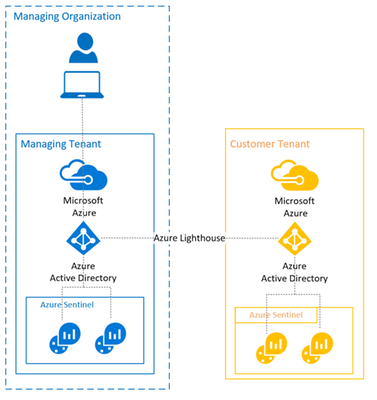
This feature is pretty straightforward. You have a managing organisation, in our case Caascad, where a managing tenant (either ocbdevcaascad.onmicrosoft.com for staging environments or ocbprodcaascad.onmicrosoft.com for prod environments) will have direct access to client resources without having to be part of his organisation. This requires the client to delegate access to his infrastructure via the creation of two resources :
- A
registration definitionthat will define the managing tenant id as well as a list of authorizations that will assign roles to different objects (users, groups, service principals) of the managing tenant. - A
registration assignmentthat will assign the registration definition to a scope (either a subcription, a single or multiple resources groups).
Please note that, as of today, Azure Lighthouse has limitations :
- Requests handled by Azure Resource Manager can be performed using Azure Lighthouse. However, requests that are handled by an instance of a resource type (such as Key Vault secrets access or storage data access) aren't supported with Azure Lighthouse.
- Role assignments must use Azure built-in roles. All built-in roles are currently supported with Azure delegated resource management except for Owner or any built-in roles with DataActions permission. The User Access Administrator role is supported only for limited use in assigning roles to managed identities.
- While you can onboard subscriptions and resource groups that have resource locks, those locks will not prevent actions from being performed by users in the managing tenant. For a similar behavior, look for deny assignments.
Setup#
To facilitate the deployment of these resources to the client, a Terraform stack has been created. The only thing we have to do for this to work is provide the inputs that will have the following format :
# Content to be added into a terraform.tfvars file

caascad_tenant_id = "00000000-0000-0000-0000-000000000000" # ID of the Caascad Azure tenant (either staging or prod)

# List of authorizations that will assign roles to Caascad user groups in the client subscription
caascad_authorizations = [
  {
    principal_id           = "00000000-0000-0000-0000-000000000000" # ID the group in Caascad tenant
    role_definition_id     = "00000000-0000-0000-0000-000000000000" # ID of the role that will be assigned to the group
    principal_display_name = "Caascad power users"
  },
  ...
]
The inputs can be directly sourced from the Infra Vault as azure_iam_cloud configuration provisions a secret in secret/zones/\(parent_zone.provider.type)/\(parent_zone.name)/azure_delegation_info. See the envs-ng azure_caascad_iam.cue for an usage example with a Azure tenant used for test (ocbtest).