Authentication#
This page describes the authentication mechanisms of Caascad's implementation on Microsoft Azure.
Keycloak#
Overview#
On Azure, Caascad users are authenticated using Keycloak Corp to federate identities using a single user base. To do that, we are using Azure's External Identities. This feature allows us to setup direct federation between our Azure AD and Keycloak Corp using the SAML2 protocol.
After the setup of direct federation, any new guest users we invite will be authenticated using direct federation. It’s important to note that setting up direct federation doesn’t change the authentication method for guest users who have already redeemed an invitation.
The authentication workflow to access the Azure portal is the following :
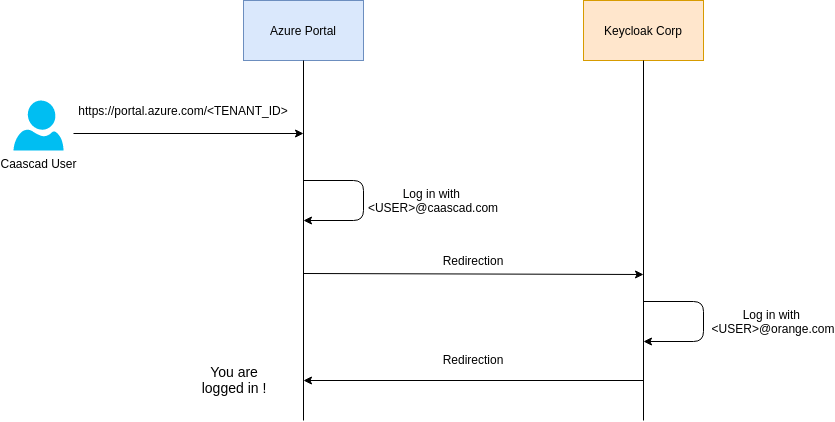
- Access the Azure portal for the given tenant. The URLs are :
- https://portal.azure.com/2cea3cb8-2b35-4527-a2d2-069ef83221f9 for staging zones
- https://portal.azure.com/3b73316f-6b3d-4de1-b879-17e82f882df8 for prod zones
- Log in using the mail address
<USER>@caascad.com. The<USER>is the same as yourorange.comusername. - You will then be redirect to Keycloak Corp.
- Log into Keycloak Corp as you would do normally (with your
orange.comemail address). - You will be redirected back to the Azure portal. The first time, you will need to confirm that you want to access the Azure tenant as well as setting up multi-factor authentication for your account.
- Congratulations, you are logged in !
Setup#
To setup federation between Keycloak Corp and Azure, severals resources are available:
- An envs-ng configuration,
azure_federation, deploying a SAML client on Keycloak Corp. This is defined in the azure_federation.cue file. - A azure_federation Terraform configuration which contains the necessary resources to be deployed on Keycloak Corp.
- Setup direct federation between Keycloak Corp and Azure (unfortunately this is not available through Azure's API yet, so we need to do this manually)
- Log into the Azure portal
- Go to
Azure Active Directory->External Identities->All identity Providers - Select
New SAML/WS-Fed IdP - Configure the IdP
- Protocol :
SAML - Domain name :
caascad.com - Method :
Parse metadata file - Metadata file : Download saml client description on keycloak located here and browse for it
- Protocol :
- Save
- An envs-ng configuration,
azure_iam_TENANTNAME, deploying an administrator service principal and AD groups plus their memberships to Caascad users. This is defined in the azure_iam.cue file.
Vault#
Overview#
Like on AWS, Vault is used to generate dynamic credentials to interact with the Azure API. It is usable with Terraform as well as with the Vault CLI.
The Vault Azure secrets engine dynamically generates Azure service principals along with role and group assignments. Vault roles can be mapped to one or more Azure roles, and optionally group assignments, providing a simple, flexible way to manage the permissions granted to generated service principals.
Each service principal is associated with a Vault lease. When the lease expires (either during normal revocation or through early revocation), the service principal is automatically deleted.
Vault Azure engine has two ways to operate :
-
Existing service principal: Vault uses a pre existing service principal and will only create a new password when someone request new credentials
-
Dynamic service principal: Vault will create a new service principal each time new credentials are requested
The two approches have its pros and cons. The choice has been made to use the dynamic service principals for several reasons :
- It is way safer to use a temporary account for API interactions. This form of credentials is decoupled from any other application and is not subject to permissions changes as it is deleted after a certain amount of time
- It offers a better granularity regarding audits because a given service principal is automatically linked to the person who requested it
- Existing service principal can only have a limited amount of passwords. It is not explicitly said what the limit is but it can happen and we don't want this to happen when requesting credentials using Terraform.
This mode has one downside that must be taken into account. Dynamic service principals only work if the desired Azure resources can be provided via the RBAC system.
Infra Zones#
Setup#
To setup Vault's integration with Azure, severals resources are available:
- Two envs-ng configurations,
vault_azure_infra_caascad_stagingandvault_azure_infra_caascad_prod, deploying resources on both staging and prod tenants. This is defined in the vault_azure_infra.cue file. - A vault_azure_infra Terraform configuration which contains the necessary resources to be deployed on both Azure and Vault Corp.
- Two Vault policies
cscd-manage-azureandcscd-use-azurethat can be used by Trackbone, and OIDC users to interact with Azure related resources on Vault Corp. These are defined in the vault_roles module.
The deployment of all these resources results in the creation of two Vault Azure backends: azure-caascad_staging for staging and azure-caascad_prod for production.
Similarly to AWS, Vault roles matching the Azure roles are available:
cscd-power-userwill assign theContributorrole
Usage#
To obtain Azure credentials from Vault, you can use the vault_azure_access_credentials data source as follows :
provider vault {
  address            = "https://vault.corp.caascad.com"
  add_address_to_env = true
}

data "vault_azure_access_credentials" "creds" {
  backend                   = "azure-caascad_staging" # Either azure-caascad_staging or azure-caascad_prod
  role                      = "administrator"         # Either administrator, power_user or read_only
  validate_creds            = true                    # Whether generated credentials should be validated before being returned
  num_sequential_successes  = 3                       # The number of sequential successes required to validate generated credentials. Defaults to 8. We recommend 3.
  num_seconds_between_tests = 5                       # The number of seconds to wait between each test of generated credentials. Defaults to 7. We recommend 5.
}

# You can then use this data source to configurer the azure provider for example
provider "azure" {
  client_id     = "${data.vault_azure_access_credentials.creds.client_id}"
  client_secret = "${data.vault_azure_access_credentials.creds.client_secret}"
}
Cloud Zones#
Setup#
To setup Vault's integration with Azure for Cloud zones, severals resources are available:
- An envs-ng configurations,
azure_iam_cloud. This is defined in the azure_iam_cloud.cue file. - A azure_iam_cloud Terraform configuration which contains the necessary resources to be deployed on both Azure and Vault Corp.
The deployment of all these resources results in the creation of a Vault Azure backend role: "\(zone.name)_power-user with Contributor permissions scoped on the resource group of the zone.
In addition, all Caascad users will be members of the Azure AD group linked to the Vault Azure backend role.
Client Zones#
Since we are using Azure Lighthouse to access client resources directly from Caascad tenants and dynamic service principals generated by vault are automatically assigned to the corresponding group, we don't need any more vault backend.
A client, needs to run the public Terraform configuration azure-caascad-iam with the outputs from the related Cloud zone. For praticity, those outputs are available as a Vault secret. See the envs-ng azure_caascad_iam.cue file for more information.