Cluster zones#
1 - Requirements#
Admin Zone#
The only requirement to deploy a cluster zone is that the admin zone of the same line is fully deployed.
2 - Find cluster zone name (ZONE_NAME variable)#
Info
Please note that the cluster have an id. For example kub-10000 id is 10000. That id is used to pick a network in the IPAM. The IPAM is generated by the same package.
Informations about cluster id repartition per line and provider can be found in ipam.cue in the same directory.
View the IPAM content:
cd "${ENVS_NG}/zones/ngot_zones/"
cue export | jq -r '.ipam_tree' | fx # fx can be installed via the toolbox: toolbox install pkgs.fx
Find cluster with enabled: false :
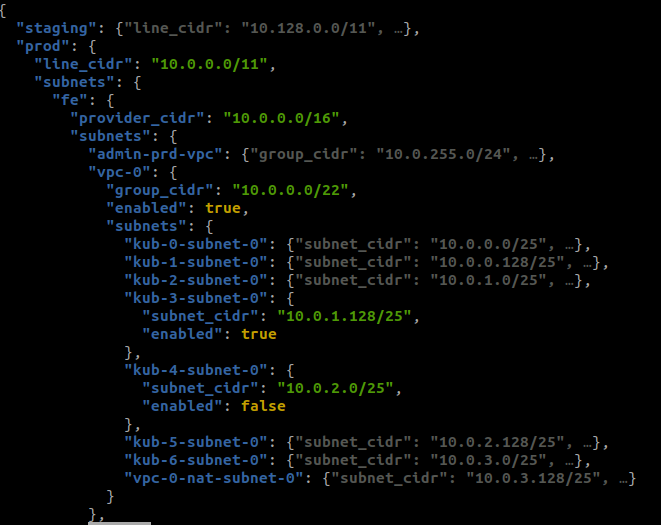
In this example kub-4 can be deployed.
Prerequisites#
Inputs#
export GIT_PATH="${HOME}/git/"
export ZONE_NAME="kub-..."
export ENVS_NG="${GIT_PATH}/caascad/terraform/envs-ng"
3 - Declare zone in zones module (envs-ng)#
Clone envs-ng:
Repository: caascad/terraform/envs-ng
# git clone git@git.corp.caascad.com:caascad/terraform/envs-ng.git "${ENVS_NG}"
cd "${ENVS_NG}"
git pull
git switch -c "${ZONE_NAME}"
nix-shell
To declare the new zone. Use any kub-... zone as an example.
Example declaration in clusters.cue:
"kub-10000": type: "cluster"
Note
Clusters are built upon a model that can be found in models.cue. By default it provides 2 node pools, 1 per AZ (az a and b). If you need a specific cluster configuration, you will have to provide the kubernetes parameters overrides. For example if we need another flavor for all of our nodes (available flavors), we would declare:
"kub-10000": parameters: kubernetes: pools: [string]: flavor_id: "c3.xlarge.2"
Generate static files and commit your changes
# Run script to generate static files from zones
generate-static-zones-files
# Add all modifications to the commit
git add zones/
git add gen/
git commit -m "Add ${ZONE_NAME} zone"
# Create target branch
git push -u origin "${ZONE_NAME}"
Create and submit your MR
- Comment your MR with message : `check zones` to trigger `check-zones` pipeline and validate the impacts of your changes on environments.

!!! info
    Please wait for the CI job completion before asking a validation.
4 - Build cluster group#
The cluster belongs to a group managed by the admin zone.
To find the cluster group:
cd ${ENVS_NG}/zones/ngot_zones
eval $(cue export | jq --arg z "$ZONE_NAME" -r '.zones[$z] | "export GROUP_NAME=\(.group_name)\nexport ADMIN_ZONE_NAME=\(.admin_zone_name)"')
Now we have the group name and the admin zone name we can build the group:
cd ${ENVS_NG}/contexts/ngot
trackbone apply -c group_${GROUP_NAME} -z ${ADMIN_ZONE_NAME} --add-children
5 - Bind the DNS private zones to the new VPC (group)#
cd ${ENVS_NG}/contexts/ngot
trackbone apply -c ngot_dns_zones -z ${ADMIN_ZONE_NAME}
6 - Silences#
To avoid alerting during the provisioning period of a new NGOT cluster, it is important to set a silence.
xdg-open 'https://karma-infra.infra-prd.caascad.com/?m='$(echo '{"am":[{"label":"svc-monitoring-stack-corp-prd-1","value":["svc-monitoring-stack-corp-prd-1"]},{"label":"svc-monitoring-stack-corp-prd-2","value":["svc-monitoring-stack-corp-prd-2"]}],"m":[{"n":"cluster","r":false,"e":true,"v":["KUB-XXXXXX"]}],"d":1440,"c":"silence_cop '"$(date "+%d%m%Y" -d "2 day")"' Provisionning NGOT cluster KUB-XXXXXX"}' | sed -e "s/KUB-XXXXXX/${ZONE_NAME}/g" | base64 -w0)
xdg-open 'https://karma-infra.infra-stg.caascad.com/?m='$(echo '{"am":[{"label":"svc-monitoring-stack-corp-stg-1","value":["svc-monitoring-stack-corp-stg-1"]},{"label":"svc-monitoring-stack-corp-stg-2","value":["svc-monitoring-stack-corp-stg-2"]}],"m":[{"n":"cluster","r":false,"e":true,"v":["KUB-XXXXXX"]}],"d":1440,"c":"silence_cop '"$(date "+%d%m%Y" -d "2 day")"' Provisionning NGOT cluster KUB-XXXXXX"}' | sed -e "s/KUB-XXXXXX/${ZONE_NAME}/g" | base64 -w0)
7 - Build the cluster zone#
Start trackbone:
cd ${ENVS_NG}/contexts/ngot
trackbone apply -z ${ZONE_NAME} --add-services -t bootstrap=true --non-interactive --detailed-exitcode -n 8
The deployment should run smoothly. If it fails on a step, you can restart the deployment from it:
trackbone apply -c <failed_conf> -z ${ZONE_NAME} --add-services -t bootstrap=true --cascade --non-interactive --detailed-exitcode -n 8
Note
If problems are related to Rancher (example: rancher2-ngot-client configuration), check the status of the cluster on Rancher.
8 - Build the contract zone and service zone related to the cluster zone#
When deploying a new cluster, we also deploy a service zone for ingresses linked to the cluster stacks. This service zone needs a contract zone. We deploy both below:
# Contract zone
trackbone apply -z obs-${ZONE_NAME} -t bootstrap=true --non-interactive --detailed-exitcode -n 8
# Service zone
trackbone apply -z svc-${ZONE_NAME} -t bootstrap=true --non-interactive --detailed-exitcode -n 8 --add-services
Then update some services of the cluster zone:
trackbone apply -z "${ZONE_NAME}"   \
    -c external_dns                 \
    -c ingress_nginx_public         \
    --non-interactive
Redeploy CoreDNS addon and update rewrites#
Because of a bug on the terraform provider the import on addon resources is not complet, so we need to redeploy the coreDNS addon. We also need to update the coredns rewrite rules
trackbone apply -c fe_cce_addons -z ${ZONE_NAME} --add-services --non-interactive
9 - Redeploy central Prometheus services#
Redeploy the central Prometheus rules and federation service to take the new cluster into account :
trackbone apply --non-interactive     \
 -z svc-monitoring-stack-corp-prd-1   \
 -z svc-monitoring-stack-corp-prd-2   \
 -c prometheus-rules                  \
 -c federate-metrics-mom-scrapeconfig \
 --add-services
trackbone apply --non-interactive     \
 -z svc-monitoring-stack-corp-stg-1   \
 -z svc-monitoring-stack-corp-stg-2   \
 -c prometheus-rules                  \
 -c federate-metrics-mom-scrapeconfig \
 --add-services
10 - Update drifts pipeline#
Follow this page to update the list of configuration's zones and update concourse pipelines