Nginx Alertreceiver#
Schemas#
Global architecture#
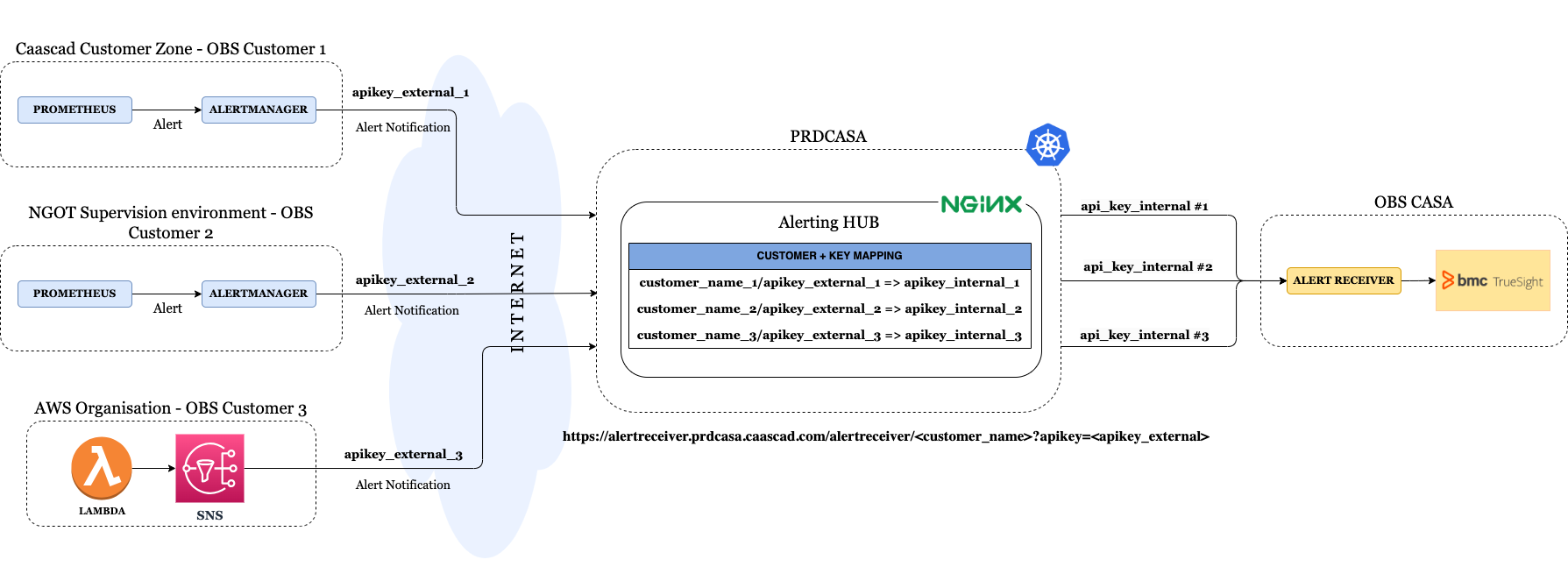
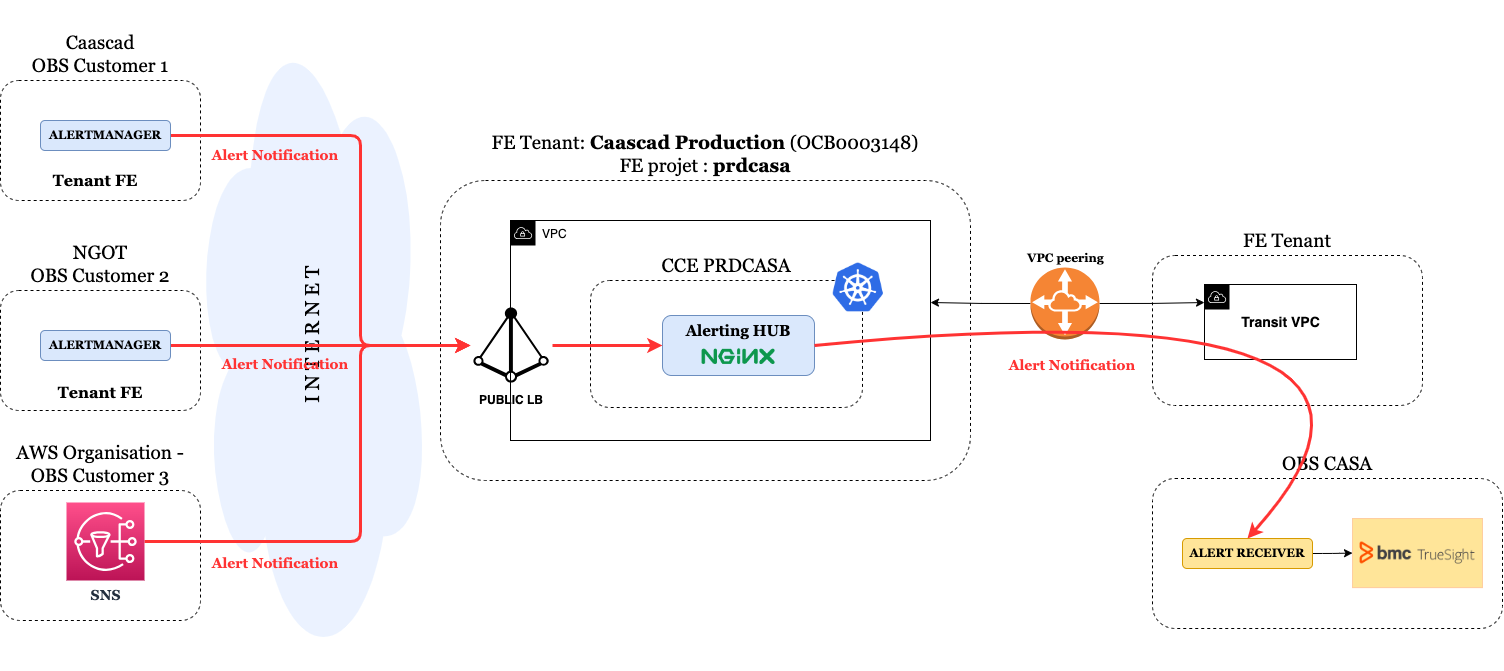
Network architecture#
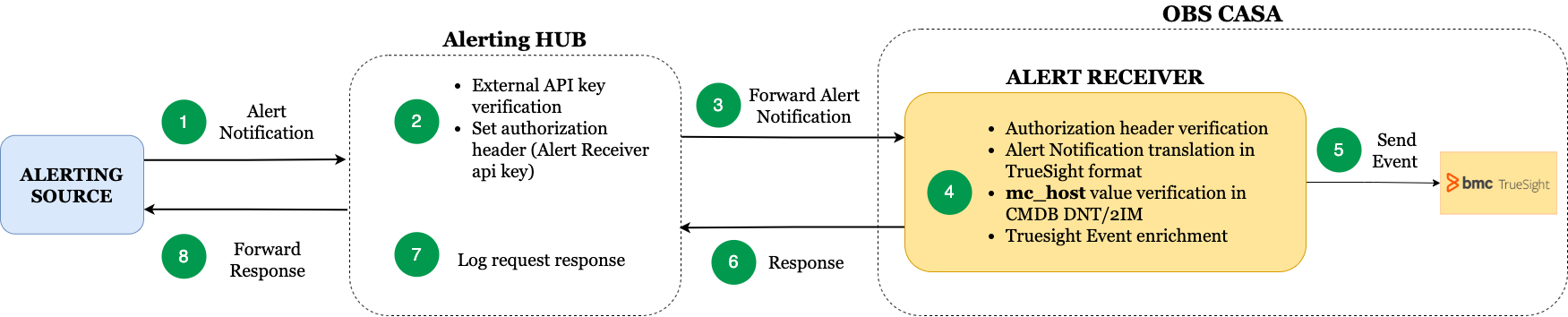
Workflow#
Goal#
Alert notifications are correctly routed and formatted to CASA's AlertReceiver component through an NGINX reverse proxy.
Thus, alerts can be reported in TrueSight.
In the rest of the documentation, this reverse proxy is called Nginx-Alertreceiver.
Alerts sent to Nginx-Alertreceiver can have several sources :
- internal source: Caascad Alertmanager
- internal source: NGOT Alertmanager
- external source: Cloud Providers client
How it works ?#
Customers list#
The list of customers is defined in nginx-alertreceiver configuration.
#ZonesMonitoredByTruesight: ["customer-1", "customer-2", ...]
Connection between Nginx-Alertreceiver and AlertReceiver#
We use AlertReceiver External IP which is defined in nginx-alertreceiver configuration.
#NginxAlertReceiverIp: [...]
API keys#
Description#
For each customer, we have at least one pair of API keys:
- an external API key: which allows authentication between the source of alerts and Nginx-Alertreceiver
- an internal API key: which allows authentication between Nginx-Alertreceiver and Alertreceiver
API keys pairs are generated for the list of customer defined in the nginx-alertreceiver configuration.
API key pairs are stored in Vault: secret/list/applications/nginx-alertreceiver.
There is a directory for each customer. And in this directory are the secrets that contain the API key pairs.
The secret name is the secret generation timestamp.
Example with customer name customer-1:
vault read secret/applications/nginx-alertreceiver/customer-1/1673454209
Key                 Value
---                 -----
refresh_interval    768h
external_apikey     xxxxxxxxxxxxxxxxxxxxxxxxxxxxxxxx
internal_apikey     yyyyyyyyyyyyyyyyyyyyyyyyyyyyyyyy
External API key rotation#
For a customer, it is possible to have several pairs of API keys. This is useful to be able to rotate external API keys.
All API key pairs have the same internal API key, only the external API key is different.
Example with customer name customer-1:
vault list secret/applications/nginx-alertreceiver/customer-1
Keys
----
1673454209
1674231329
vault read secret/applications/nginx-alertreceiver/customer-1/1673454209
Key                 Value
---                 -----
refresh_interval    768h
external_apikey     xxxxxxxxxxxxxxxxxxxxxxxxxxxxxxxx
internal_apikey     yyyyyyyyyyyyyyyyyyyyyyyyyyyyyyyy
vault read secret/applications/nginx-alertreceiver/customer-1/1674231329
Key                 Value
---                 -----
refresh_interval    768h
external_apikey     zzzzzzzzzzzzzzzzzzzzzzzzzzzzzzzz
internal_apikey     yyyyyyyyyyyyyyyyyyyyyyyyyyyyyyyy
Ingress#
For all customers there is only one ingress:
kubectl get ingress -n nginx-alertreceiver -o yaml
apiVersion: v1
- [...]
  metadata:
    annotations:
      nginx.ingress.kubernetes.io/configuration-snippet: |-
        if ($request_uri = "/alertreceiver/customer-1?apikey=xxxxxxxxxxxxxxxxxxxxxxxxxxxxxxxx") {
          set $code "yyyyyyyyyyyyyyyyyyyyyyyyyyyyyyyy";
          set $cc_client "customer-1";
          set $resp_body "";
        }
    if ($request_uri = "/alertreceiver/customer-1?apikey=zzzzzzzzzzzzzzzzzzzzzzzzzzzzzzzz") {
          set $code "yyyyyyyyyyyyyyyyyyyyyyyyyyyyyyyy";
          set $cc_client "customer-1";
          set $resp_body "";
        }
    if ($request_uri = "/alertreceiver/customer-2?apikey=aaaaaaaaaaaaaaaaaaaaaaaaaaaaaaaa") {
          set $code "bbbbbbbbbbbbbbbbbbbbbbbbbbbbbbbb";
          set $cc_client "customer-2";
          set $resp_body "";
        }
    [...]
        proxy_set_header        Authorization $code;
      nginx.ingress.kubernetes.io/rewrite-target: /v1/send
    name: nginx-alertreceiver
    [...]
  spec:
    rules:
    - host: alertreceiver.prdcasa.caascad.com
      http:
        paths:
        - backend:
            serviceName: nginx-alertreceiver-external-ip
            servicePort: 443
          path: /alertreceiver
          pathType: Prefix
    tls:
    - hosts:
      - alertreceiver.prdcasa.caascad.com
      secretName: nginx-alertreceiver-tls
Alertmanager#
In case Caascad/NGOT Alertmanager sends alerts to Nginx-Alertreceiver here is the configuration for the customer-1 example :
[...]
    receivers:
    - name: nginxalertreceiver
      webhook_configs:
      - send_resolved: true
        url: https://alertreceiver.prdcasa.caascad.com/customer-1?apikey=zzzzzzzzzzzzzzzzzzzzzzzzzzzzzzzz
[...]
The external API key used is the last generated API key retrieved from Vault.
Requests logs#
The Reverse Proxy logs are accessible from the nginx-alertreceiver pod.
All the information useful for debugging the query is available :
alerts_source: request source customeringress_name: name of the ingress where the configuration is locatedcc_client: variable configured in the ingress to know the sending zonerequest_query: external API key used by the senderrequest_body: payload sent by the issuerresp_body: response payload sent by AlertReceiverresp_body -> API_Key: API key used by Nginx-Alertreceiver
The list is defined in nginx-alertreceiver configuration.
#NginxAlertReceiverLogFormat: [...]
Criticity and status of NGOT alerts#
This section is only for internal source NGOT Alertmanager.
In Alertmanager, two statuses are sent by default : resolved and firing.
To send warning alerts, we added a third status: warning.
These statuses are used in Truesight to define whether they are warning or critical alerts.
For each alert, alert.status is rewritten based on alerts.labels.severity :
-
if severity is
warningorWarning, status is rewritten aswarning(modified in lua code of nginx-alertreceiver) -
in all other cases including
critical, keeps default value :firing
Final translation dictionary :
| BEM fields | Webhook Fields |
|---|---|
| severity | alerts.status |
| Severity Mapping | Webhook status Value |
|---|---|
| OK | resolved |
| Warning | warning |
| Critical | firing |