Client zones#
This page describes the architecture of a Client Zone on Azure.
Overview#
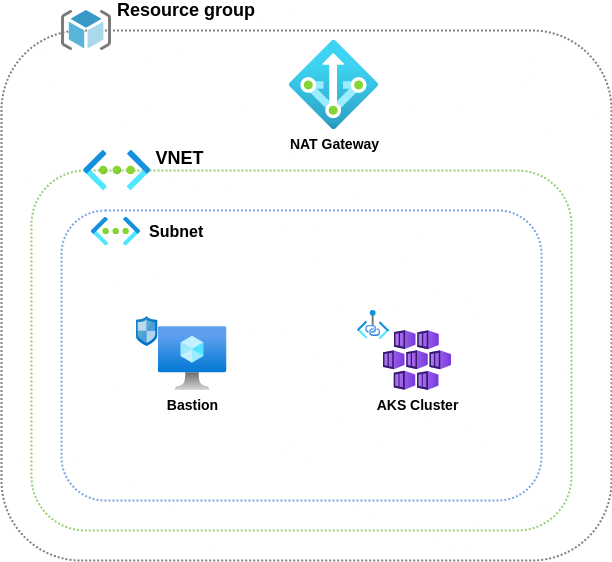
Client zone architecture on Azure is pretty similar to what is deployed on other providers :
- A Resource Group per zone to hold the resources
- A VNet with a subnet
- A Virtual Machine used a bastion
- An AKS cluster hosting client applications
IAM#
Before deploying any Azure resource, we need to setup access to the client tenant by creating a delegation. To do that, we have the azure_caascad_iam Terraform stack.
If this zone is a staging zone, we need to execute it on our side. If this a production zone, this is the responsability of the client to do it because he is the only one having access to its Azure tenant.
Base#
Some resources are necessary to prepare for the zone deployment :
- A resource group that will hold Azure resources
- A public and private Route53 DNS zone that will expose both
<ZONE>.caascad.comand<ZONE>.caascad.netdomains - A SSH keypair that will be used to connect to VMs and AKS nodes. It is also stored on the corresponding infra vault.
The deployment is done via:
- An azure_base envs-ng configuration.
- An azure_base Terraform configuration which contains the necessary resources to be deployed.
Network#
The network configuration is deployed through several resources:
- An envs-ng configuration,
azure_network, deploying the VNet and its subnet. This is defined in the azure_network.cue file. - A azure_network Terraform configuration which contains the necessary resources to be deployed.
Bastion#
To deploy the bastion, we need a few things:
- A Virtual machine
- A Public IP to expose the bastion through the internet
- A Network security group to filter access to the bastion
- Route53 DNS public and private records for the bastion instance
The corresponding configurations are :
- azure_instances envs-ng configuration
- azure_instances Terraform configuration
- bastion_provisioning is also used to deploy Caascad operators ssh keys on the bastion
AKS#
The Kubernetes cluster is deployed with :
- An AKS cluster with a default node pool
- Extra node pools if needed
- A Public IP that will be used as an egress IP to ease IP filtering on Caascad infrastructure
- A Role assignement needed by AKS to retrieve Public IPs information
This is done with :